welcome to my court
Josephine KimProduct designer · Cornell Information Science · graduating Dec 2026
Making Cornell Knowledge Easier to Navigate With AI
Designing a retrieval-grounded campus assistant that turns scattered Cornell resources into one conversational starting point.
The Problem
Cornell students have access to almost everything they need. Finding it is the hard part.
Academic, social, advising, wellness, club, and career resources all exist, but they are spread across university websites, long PDFs, email announcements, Instagram, Reddit, and informal student spaces. The information is not missing. It is scattered.
That fragmentation shows up as four recurring questions students cannot easily answer on their own.
- Where do I even begin searching?
- Which source is actually trustworthy?
- What terminology should I be using?
- Is what I just found still current?
The gap is sharpest for new, international, and transfer students who are still learning how the university is structured, and it reappears for upperclassmen looking outside their own college.
Product Strategy
We kept it to a simple chatbot MVP instead of a big student portal.
A portal would have added another destination to an ecosystem that already has too many. The team chose the smallest product that could test the real hypothesis: that a conversational, retrieval-grounded entry point reduces the friction of finding campus information. Everything that did not serve asking and answering a question was cut.
Simple by default
Keep the interface focused entirely on asking and answering questions, with no secondary navigation to learn.
Conversational, not institutional
Design the assistant to feel like a knowledgeable upperclassman or peer advisor rather than an official portal.
Grounded over generative
Answer from retrieved Cornell sources instead of relying on an unconstrained chatbot.
Transparent uncertainty
When the system cannot find enough relevant information, say so and suggest where to look next.
How the RAG System Works
Every question gets sent to the model along with the Cornell sources that should answer it.
- 01
Student question
A student asks in natural language, without needing the right campus terminology.
- 02
Semantic retrieval
The retriever searches the curated text database for passages related to the question.
- 03
Relevant sources
Roughly 15 curated Cornell advising and student community sources form the knowledge base.
- 04
LLM response
The model composes an answer grounded in the retrieved text rather than free generation.
- 05
Cited answer
The student receives a friendly, conversational reply with the source categories behind it.
The MVP knowledge base held roughly 15 curated text sources drawn from Cornell advising resources and student community sources. The retrieval layer is entirely backend. Students never see or manage it, which is exactly the point: the complexity of the information landscape stays on our side of the interface.
Designing the Experience
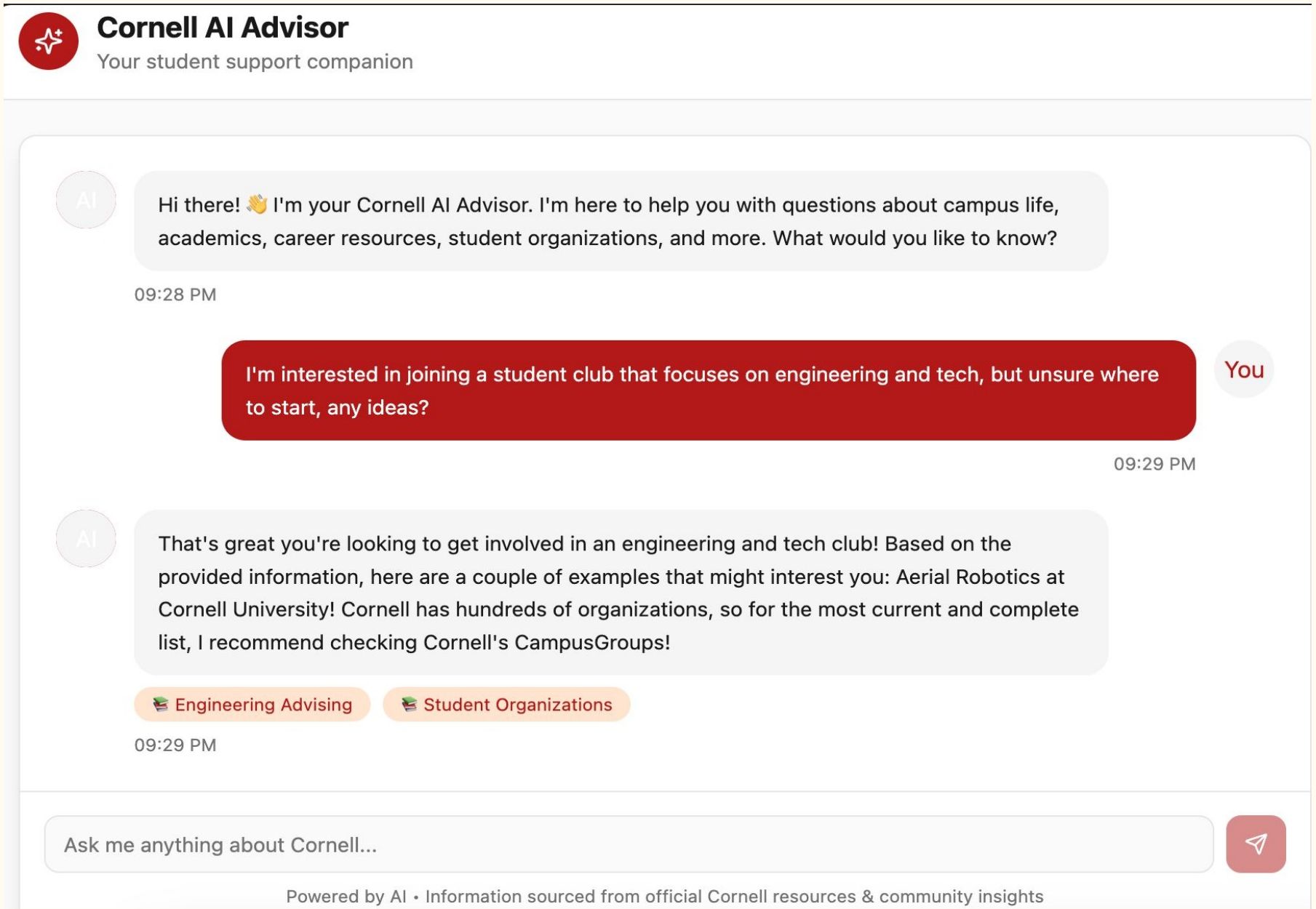
The whole point is less searching, so we kept the interface as simple as possible.
One input, one thread. The only functionality is the conversation itself.
Restrained red accents tie the assistant to a familiar campus context.
Students ask the way they would ask a friend, not the way a website expects.
Prompted to respond like an experienced upperclassman: friendly, direct, encouraging.
Answers are drawn from retrieved documents, not from open-ended generation.
Category chips under each answer show what kind of source informed the reply.
When the knowledge base falls short, the assistant says so and points elsewhere.
Simplicity here was a decision, not a shortcut. Adding navigation, dashboards, or filters would have rebuilt the very problem the product was meant to dissolve.
Testing With Cornell Students
We ran think-aloud sessions with three Cornell students from different majors.
- Finding student organizations
- Asking academic and major questions
- Exploring general Cornell resources
- Asking personally relevant campus questions
Participants specifically appreciated:
- The simple, familiar chat interface
- Discovering clubs and opportunities they had not heard of
- Answers being grounded in identifiable sources
- Greater trust in the retrieval-based approach
What Testing Revealed
People liked it, but the same sessions showed where the MVP would break at scale.
Coverage gaps
The roughly 15-source knowledge base was too small to answer niche or highly specific questions well.
Information freshness
A manually curated dataset has no real-time updates, so time-sensitive details can go stale.
Potential bias
A small, hand-selected corpus can overrepresent particular colleges or student experiences.
Trust requires boundaries
The assistant should stay a starting point for exploration, not a replacement for advisors or official guidance.
Read together, these limits define what the prototype actually proved: that the interaction model works, and that the harder work is data breadth, currency, and accountability.
Designing for Trust
Trust ended up being a design problem before it was a technical one.
Retrieval constrains the answer space, which reduces hallucination in a context where wrong advice has real consequences.
The assistant was instructed to say when it does not know, and to suggest a way to keep looking.
For decisions requiring human judgment, the right answer is an advisor or an official office, not a chatbot.
These decisions showed up directly in testing. Participants said they trusted the answers more because responses were tied to identifiable sources, which suggests that visible grounding does as much for perceived reliability as it does for actual accuracy.
Reflection and Next Steps
Even a small retrieval system can make a messy information setup a lot easier to use.
The project showed that grounding a conversational assistant in even a modest curated corpus changes how approachable campus information feels. It also made clear how much work sits between a promising prototype and an assistant that is genuinely trustworthy at scale, most of it in data stewardship and boundary setting rather than in the interface.
Expand and diversify the knowledge base.
Create automated and real-time information updates.
Improve discovery for niche questions.
Evaluate retrieval and response accuracy quantitatively.
Test with a larger and more diverse student population.
Continue defining boundaries between AI assistance and human advising.